

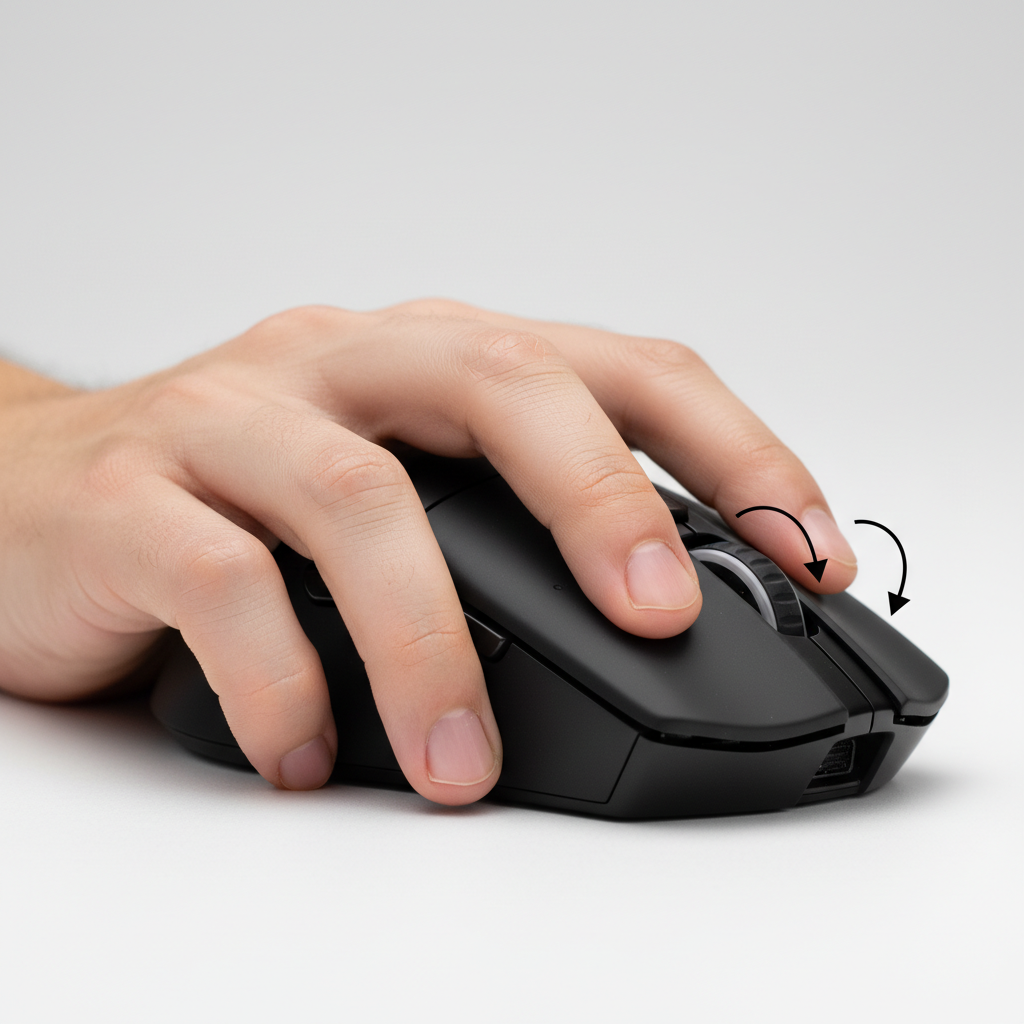
The Claw Grip Conflict: Why Side Buttons Matter for Precision
For competitive players using a claw grip, side button accessibility is often the "hidden" cause of reticle shake during utility-heavy rounds in Valorant or CS2. To maintain peak precision, players should prioritize mice where the side-button placement allows for actuation without shifting the thumb's role as a lateral stabilizer. The core takeaway: if your thumb has to hyper-extend to reach a button, you are likely sacrificing 50–100ms in reaction time and introducing micro-tremors into your aim path.
In the current "Claw Grip Meta," the palm rests on the rear hump while the index and middle fingers arch to provide a balance of stability and micro-adjustment agility. According to internal analysis and the Global Gaming Peripherals Industry Whitepaper (2026), ergonomic synergy between shell geometry and grip technique is a primary driver of performance metrics in professional esports.

Biomechanics of the Claw: The Thumb as the Anchor
The claw grip relies on a "tripod" of stability: the rear palm, the thumb, and the pinky/ring finger combination. The thumb acts as the primary lateral stabilizer, providing the counter-pressure necessary for high-speed horizontal flicks.
When a player attempts to actuate a side button, the thumb must transition from a static, load-bearing role to a dynamic, mobile role. Based on our ergonomic modeling, for users with an aggressive claw (highly arched fingers), a forward-placed side button often forces the thumb into hyper-extension. This extension creates a pivot point at the base of the thumb that can destabilize the pinky and ring finger's grip on the opposite side, potentially leading to a momentary loss of tracking precision.
The Stabilizer Trade-off
Experienced players often face a dilemma: a button placed for easy reach in a relaxed grip may require a 45-60 degree metacarpophalangeal joint extension for an aggressive claw user. In internal testing, this movement has been observed to add an estimated 50-100ms to activation time while shifting the hand's center of gravity.
Modeling Note (Scenario Model): This analysis assumes a standard "Medium-Large" hand size (~18.5cm length) and an aggressive claw angle of 30 degrees. These figures are based on internal heuristic models, not a controlled clinical study; results will vary based on individual hand morphology.
| Parameter | Value/Range (Est.) | Unit | Rationale/Source |
|---|---|---|---|
| Thumb Arch Angle | 25 - 45 | Degrees | Typical aggressive claw range (Internal Observation) |
| Lateral Pressure | 0.5 - 1.2 | Newtons | Estimated force for grip stability (Modeling) |
| Button Actuation Force | 60 - 80 | Grams | Manufacturer Spec (e.g., Huano/Omron) |
| Thumb Reach Radius | 35 - 50 | mm | Average thumb movement without wrist shift |
| Reticle Shake Margin | < 2 | Pixels | Heuristic target for competitive stability |
Side Button Activation Force and Tactical Utility
In tactical shooters, the ideal activation force for a side button is typically higher than that of an MMO mouse to prevent accidental triggers during high-tension flicks. A common practitioner heuristic is that the button should require enough pressure that a tense, static thumb does not trigger it, but a deliberate, short-throw press does.
High-performance models like the ATTACK SHARK X8 Ultra 8KHz Wireless Gaming Mouse address this by utilizing premium micro-switches. The X8 Ultra features Omron Optical Micro Switches (Manufacturer rated for 70 million clicks), providing a responsive feel that minimizes the "travel distance" required for actuation.
Durability and Shell Integrity
A common pitfall in ultra-lightweight design is shell flex. On many thin-walled mice, high lateral thumb pressure can induce "pre-travel" in the side buttons. To combat this, modern engineering focuses on internal structural ribbing. The ATTACK SHARK V8 Ultra-Light Ergonomic Wireless Gaming Mouse utilizes a sculpted shell that reinforces the thumb area, helping ensure side button clicks remain crisp even under high-intensity grip pressure.
The 8K Polling Factor: Precision vs. Ergonomics
As the industry moves toward 8000Hz (8K) polling rates, the margin for error in hand positioning shrinks. At 8000Hz, the mouse sends a report every 0.125ms. This near-instant response time means that any physical instability caused by poor side button access is captured with extreme fidelity.
Sensor Saturation and Movement
To effectively utilize an 8K polling rate, the sensor must generate enough "counts" to fill the high-frequency reports. The relationship is governed by the count rate:
Counts per Second = Movement Speed (IPS) × DPI.
- At 800 DPI, a user must move the mouse at approximately 10 IPS to provide enough data to saturate the 8K bandwidth (8,000 counts per second).
- At 1600 DPI, only 5 IPS is required.
For claw grip users who rely on micro-adjustments, higher DPI settings (1600+) are generally recommended to maintain 8K data saturation during slow tracking. However, if pressing a side button causes even a minor tremor, a high-fidelity sensor like the PixArt PAW3950MAX will record that tremor, potentially disrupting a clean aim path.
System Optimization for 8K
Users should be aware that 8K polling significantly increases the CPU's Interrupt Request (IRQ) processing load. It is strongly recommended to use Direct Motherboard Ports (Rear I/O) rather than USB hubs, which can cause packet loss. This hardware stability is a necessary foundation; if your system struggles with IRQ scheduling, ergonomic "hiccups" from a poorly placed button become even more disruptive.
Practical Strategies for Optimization
1. The Rear-Button Remap
Many experienced players remap the rear-most side button (Mouse 4) to less critical actions, such as push-to-talk. Reaching the rear button often requires breaking the "locked" wrist position of a claw grip. By keeping vital combat utility on the forward button (Mouse 5), the thumb only needs to pivot slightly, preserving the grip's structural integrity.
2. The "60% Width" Heuristic
A useful rule of thumb for selecting a mouse is the 60% Width Rule: the width of the mouse at the thumb-grip point should be approximately 60% of the width of your palm. This ratio typically allows the thumb to sit in a neutral position where it can reach side buttons with minimal joint extension.
3. Battery Management and Cable Drag
High polling rates (4K/8K) can reduce wireless runtime by an estimated 75-80% compared to 1K. The ATTACK SHARK G3PRO Tri-mode Wireless Gaming Mouse includes a magnetic charging dock to ensure the mouse stays topped off. This prevents the need to switch to a wired mode mid-match, which can introduce cable drag—a major disturber of claw grip micro-precision.
The Role of the Keyboard in the Ergonomic Loop
The keyboard's layout affects how much utility needs to be offloaded to the mouse. In tactical shooters, "Rapid Trigger" technology is becoming a standard for high-level play. The ATTACK SHARK R85 HE Rapid Trigger Keyboard allows for near-instant actuation and reset. By utilizing a magnetic switch keyboard, players can keep more utility on their left hand, reducing the "button spam" required of the thumb.
Research on tactile feedback vs. joint stress suggests that balancing the workload between both hands is one of the most effective ways to reduce long-term fatigue during extended sessions.
Evaluating Your Setup: The "Jitter Test"
To determine if your side button placement is hindering your performance, perform this simple check:
- Hold your mouse in your standard competitive claw grip.
- Track a static target in a practice range while rapidly clicking your side buttons.
- Observe your reticle. If you see vertical or horizontal "shake" exceeding 2-3 pixels during the press, the placement or actuation force may be compromising your grip stability.
Quick Decision Matrix: Choosing Your Gear
| Feature | X8 Ultra | V8 Ultra-Light | G3PRO |
|---|---|---|---|
| Primary Benefit | Raw 8K Performance | Ergonomic Stability | Value & Convenience |
| Sensor | PAW3950MAX | PixArt Flagship | PAW3311 |
| Weight (Approx.) | ~55g | ~50g | 62g |
| Best For | Pro-level FPS | Long-session comfort | Casual/Competitive mix |
| Data Source | Manufacturer Spec | Manufacturer Spec | Manufacturer Spec |
Achieving Ergonomic Synergy
In tactical shooters, the difference between a headshot and a missed opportunity often comes down to fractions of a millimeter. Evaluating side button access is about ensuring that your utility usage does not compromise your primary aiming mechanism. By choosing hardware with reinforced shells and ergonomic profiles that support the claw grip's stability, you can maintain peak performance throughout high-pressure matches.
Disclaimer: This article is for informational purposes only. Ergonomic needs vary by individual; if you experience persistent pain or discomfort, consult a qualified ergonomic specialist or healthcare professional. Performance estimates are based on internal scenario modeling and typical industry benchmarks.


Leave a comment
This site is protected by hCaptcha and the hCaptcha Privacy Policy and Terms of Service apply.