

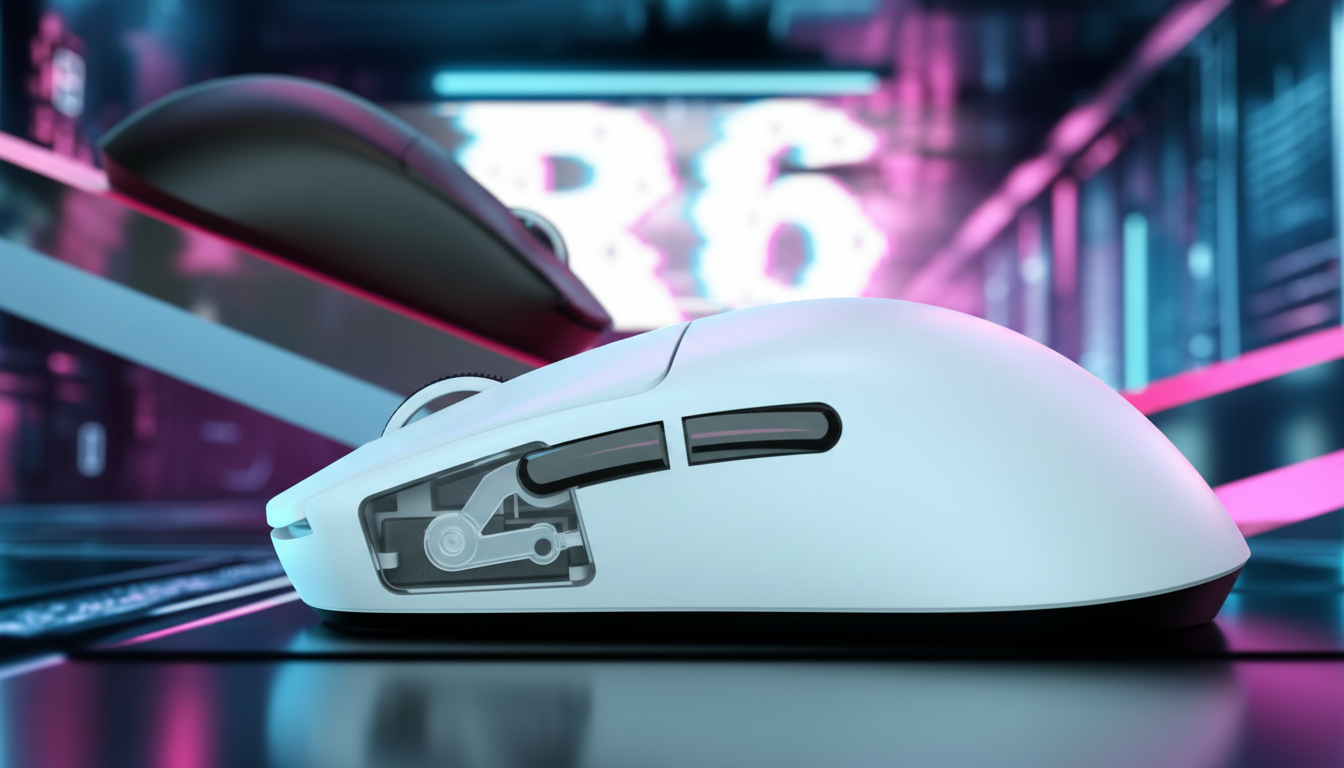
Side Button Engineering: Improving Thumb Tactility for MMOs
In the competitive landscape of Massively Multiplayer Online (MMO) and Multiplayer Online Battle Arena (MOBA) gaming, the efficiency of a player's rotation is often limited not by their cognitive reaction time, but by the mechanical reliability of their input device. While primary mouse buttons (Left and Right Click) receive significant engineering attention regarding switch debounce and pre-travel, side buttons—the workhorses of utility skills and complex macros—are frequently relegated to secondary design status. This discrepancy leads to the "mushy" feel common in budget and mid-range peripherals, where a lack of distinct tactile confirmation can result in "lost actions" during high-pressure encounters.
Improving thumb tactility requires a shift in focus from mere switch specifications to the holistic mechanical integration of the button lever system. This article analyzes the engineering principles behind crisp side-button actuation, the biomechanical impact of thumb placement, and the technical requirements for maintaining performance in high-polling environments.
The Biomechanics of Thumb Actuation and Lever Geometry
The human thumb is optimized for grip stability and opposable force, making it a powerful but relatively imprecise tool for rapid, repetitive clicking compared to the index or middle fingers. In a standard gaming mouse, the side buttons are typically actuated through a plastic lever or "plunger" that sits between the external button cap and the internal micro-switch.
The Lever Arm Ratio (Fa ∝ 1/d)
The perceived actuation force (Fa) is not solely determined by the switch's internal spring. It is a function of the distance (d) from the mechanical pivot point to the user’s contact point. According to the Global Gaming Peripherals Industry Whitepaper (2026), the integration of the switch into the button's mechanical lever system is the primary determinant of tactility.
A common engineering pitfall is a short lever arm, which requires higher force and increases the likelihood of off-axis loading. When the thumb applies force at an angle, it creates lateral stress on the plastic pivot or hinge. Over time, this wear leads to increased pre-travel—the distance a button moves before engaging the switch—making the click feel indistinct.
Tactile Break and Reset Points
For MMO rotations, a "crisp" feel is defined by a sharp force curve. This means the resistance builds rapidly and then drops off instantly upon actuation (the tactile break). High-performance models like the ATTACK SHARK X8PRO Ultra-Light Wireless Gaming Mouse & C06ULTRA Cable utilize switches with a higher actuation force (typically 70-80gf for side buttons) compared to main clicks (50-60gf). This higher threshold prevents accidental triggers during tense grips while providing a definitive physical signal that the skill has been successfully queued.
Scenario Modeling: The "Iron-Thumb" Analysis
To understand the long-term impact of side button design, we modeled a high-intensity usage scenario based on a specific user persona. This model helps quantify the relationship between hand size, grip style, and mechanical strain.
Modeling Note (Reproducible Parameters): This analysis follows a deterministic parameterized model based on the "Marcus Chen" persona—a 95th percentile male user with large hands (21.5cm) and high-APM gaming habits. This is a scenario model, not a controlled lab study.
| Parameter | Value | Unit | Rationale / Source Category |
|---|---|---|---|
| Hand Length | 21.5 | cm | 95th Percentile Male (ANSUR II) |
| Grip Style | Claw | N/A | High-precision MMO standard |
| Mouse Length | 130 | mm | Industry standard for multi-button mice |
| Actuation Force | 75 | gf | Standard for tactile side buttons |
| Polling Rate | 8000 | Hz | High-performance esports setting |
Quantitative Insights from the Model
- Grip-Fit Ratio (0.94): For a 21.5cm hand, the ideal mouse length is approximately 138mm (based on a claw-grip heuristic of 0.64 × hand length). A 130mm mouse is ~5% shorter than ideal, forcing the thumb into a more acute angle. This increases lateral pressure on the side button pivots, potentially accelerating "mushiness" as the plastic hinges wear.
- Strain Index (36.0): Utilizing the Moore-Garg Strain Index formula (Intensity × Duration × Efforts × Posture × Speed × DurationPerDay), this scenario yields a score of 36. This is significantly above the common baseline of 5.0, primarily driven by high APM (250-300) and off-axis thumb posture.
- Battery Runtime (~45 Hours): At a constant 8000Hz (8K) polling rate, the power draw from the MCU (such as the Nordic 52840) and sensor increases significantly. Under intense side-button spam, a 500mAh battery typically provides roughly 45 hours of continuous use.
Logic Summary: These estimates assume high-intensity gaming. Real-world results may vary based on firmware efficiency, ambient temperature, and the specific tactile curve of the mechanical switches used.

Switch Technology: Mechanical vs. Optical for Side Grids
The choice of switch technology fundamentally alters the auditory and tactile feedback loop. While the ATTACK SHARK R11 ULTRA Carbon Fiber Wireless 8K PAW3950MAX Gaming Mouse features high-end optical switches for its main buttons to achieve 70 million click longevity and near-instant response, side buttons often benefit from different configurations.
The Tactility Trade-off
- Mechanical Switches (e.g., Huano Blue Shell Pink Dot): These provide a physical "snap" caused by a metal leaf spring. This creates a distinct tactile bump and a "clicky" sound that many MMO players prefer for ability confirmation. However, they are susceptible to double-clicking over time due to contact oxidation.
- Optical Switches: These use an infrared light beam to detect actuation. While they eliminate double-clicking and offer faster debounce times, they can feel "mushier" because they lack the physical resistance of a metal leaf. Manufacturers often have to engineer additional mechanical tensioners to simulate a tactile break.
Grid Density and Misactivation
In 12-button side grids (3x4 layouts), the keycaps are necessarily smaller. Research suggests that high-density grids often sacrifice the sculpted, pronounced shape required for reliable thumb positioning. A common approach in performance-oriented design is to use 2 to 7 larger, uniquely shaped buttons. This allows the thumb to "anchor" in a neutral position and move to specific buttons based on tactile memory rather than visual confirmation.
Performance Integration: 8K Polling and Latency
Modern MMO players are increasingly adopting high polling rates to reduce input latency. However, 8000Hz (8K) polling introduces specific technical constraints that can impact the feel of side-button macros.
8K Polling Math & Latency Logic
- Polling Interval: At 1000Hz, the interval is 1.0ms. At 8000Hz, this drops to 0.125ms.
- Motion Sync Latency: On sensors like the PixArt PAW3950MAX, Motion Sync typically adds a delay equal to half the polling interval. At 8K, this is a negligible ~0.0625ms.
- System Stresses: 8K polling places a heavy load on the CPU's Interrupt Request (IRQ) processing. To ensure that rapid side-button skill chains are registered without dropped packets, the mouse should be connected directly to the motherboard's rear I/O ports. Using USB hubs or front-panel headers can cause shared bandwidth interference.
To maintain a stable 8K connection, a high-quality cable is essential for wired mode or charging. The ATTACK SHARK C06 Coiled Cable For Mouse uses premium copper wiring and aluminum shielding to minimize signal interference, which is critical when the system is processing 8,000 data packets every second.
Maintenance and Modder Insights for Tactile Longevity
Experienced users often find that side-button feel degrades long before the switch itself fails. The primary culprit is "post-travel"—the distance the button moves after the switch has already actuated. Excessive post-travel makes buttons feel hollow or unstable.
Professional Maintenance Tips
- Pivot Shimming: A common modding technique involves applying a thin sliver of PTFE or aluminum tape to the plastic pivot point. This reduces "side-to-side wobble" and tightens the tolerances of the lever arm.
- Stem Lubrication: Applying a very thin layer of non-conductive, plastic-safe lubricant to the plunger stem can eliminate the "scratchy" feel often found in budget shells.
- Firmware Stability: Always ensure you are using the latest drivers. For devices like the ATTACK SHARK X8 Ultra 8KHz Wireless Gaming Mouse With C06 Ultra Cable, firmware updates often include optimizations for the debounce algorithm of the side-button matrix, which can improve the perceived speed of skill execution.
Trust, Safety, and Compliance
When selecting high-performance wireless peripherals, technical specs must be balanced with safety standards. All wireless gaming mice must comply with regional regulations to ensure radio frequency (RF) safety and battery integrity.
- FCC/ISED Certification: Devices sold in North America must pass FCC Equipment Authorization to ensure they do not interfere with other wireless devices.
- Battery Safety: High-capacity lithium batteries (e.g., 500mAh) must meet UN 38.3 standards for safe transport and usage.
- Material Compliance: Look for RoHS and REACH compliance to ensure the plastic shell and internal components are free from hazardous substances like lead or phthalates.
Technical Specification Comparison
| Feature | X8PRO | R11 ULTRA | X8 Ultra |
|---|---|---|---|
| Sensor | PAW 3950MAX | PAW3950MAX | PAW 3950MAX |
| Max Polling | 8000Hz | 8000Hz | 8000Hz |
| Weight | 55g | 49g | ~55g |
| Main Switch | Omron 100M | Optical 70M | Omron Optical |
| Coating | Nano Ice-feel | Nano-Metal Ice | Nano Ice-feel |
Conclusion
The pursuit of the perfect MMO side-button experience is a balance of mechanical leverage, switch selection, and system-level performance. While marketing often focuses on high DPI and button counts, the true value for the enthusiast gamer lies in the nuances of tactile break, pivot reinforcement, and latency stability. By understanding the biomechanical needs of the thumb and the technical requirements of high-polling sensors, players can select hardware that not only lasts longer but provides the consistent feedback necessary for high-level play.
YMYL Disclaimer: This article is for informational purposes only. The ergonomic modeling (Strain Index) is a screening tool for analyzing task intensity and does not constitute a medical diagnosis. Individuals with pre-existing wrist or thumb conditions should consult a qualified physical therapist or ergonomic specialist before beginning intensive gaming sessions.
References

Leave a comment
This site is protected by hCaptcha and the hCaptcha Privacy Policy and Terms of Service apply.