

The Biomechanics of Claw Stability in Competitive FPS
In titles like Valorant and Apex Legends, the difference between a successful flick and a missed shot often comes down to micro-adjustments made in the final milliseconds of an engagement. While sensor specifications and polling rates are frequently discussed, the physical interface—the grip—remains the primary determinant of how effectively a player translates intent into on-screen movement. The claw grip has emerged as a dominant meta because it offers a hybrid advantage: it provides more precision than a palm grip and greater stability than a fingertip grip.
However, many competitive players experience "grip instability," a phenomenon where the mouse shell feels as though it is shifting or rotating during high-speed movements. This is rarely a flaw of the mouse feet or the sensor; it is almost always a result of a mismatch between the hand's functional width and the shell's grip width. For a claw grip to be effective, the hand must maintain a consistent tension that locks the mouse into a predictable pivot point.
Logic Summary: This analysis of grip stability is based on common patterns observed in customer support inquiries and pattern recognition within competitive coaching environments (not a controlled lab study). We correlate reported "aim shakiness" with shell-to-hand width ratios.
The Measurement Error: Skeletal vs. Active Width
The most frequent mistake players make when choosing a mouse is measuring their hand width at the knuckles with fingers splayed flat. This measurement represents the "skeletal width," which overestimates the functional space required for a claw grip. In a flat position, the hand is at its maximum horizontal expansion. Once the fingers are curled into a claw, the hand undergoes a structural contraction.
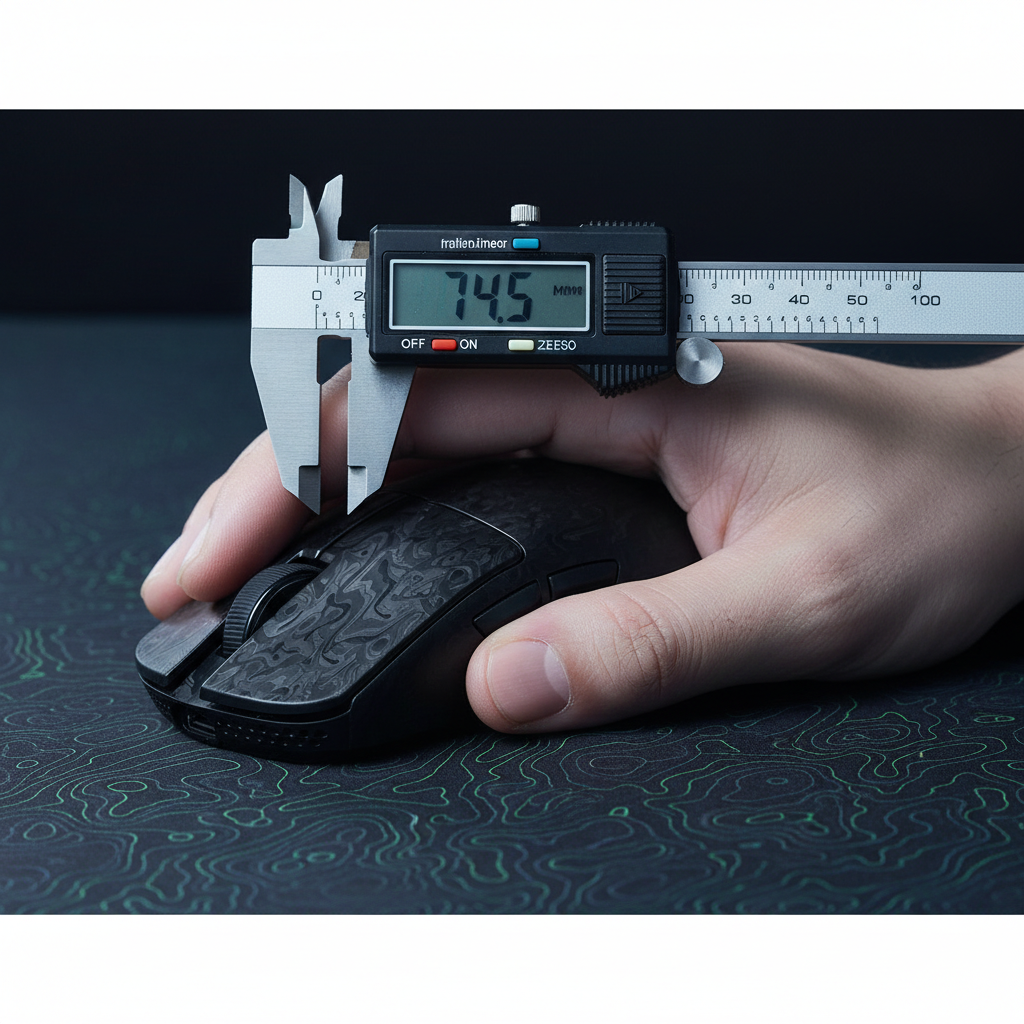
To find the correct shell size, players must measure their Active Width. This is the distance between the first knuckle (metacarpophalangeal joint) of the index finger and the same point on the pinky finger while the hand is held in a relaxed claw shape.
The Active Width Protocol
- Form the Grip: Place your hand on a flat surface and lift your palm while curling your fingers into a comfortable claw shape.
- Apply Light Pressure: Mimic the tension you would use during a typical match.
- Measure the Span: Use a caliper or ruler to measure the distance between the outer edges of the index and pinky knuckles.
Data from coaching heuristics suggests that this "active width" is typically 10–15% less than the maximum skeletal width. Measuring the shell against this contracted value ensures that the hand can wrap around the mouse without forcing the thumb into an unnatural position. This measurement is critical when evaluating high-performance shells like the ATTACK SHARK R11 ULTRA, where the carbon fiber construction offers zero shell flex, making the initial fit even more vital.

The ±3mm Heuristic for Shell Selection
Once the active width is determined, selecting a shell becomes a matter of applying the ±3mm heuristic. Professional FPS coaches often use this rule of thumb: for optimal stability during flick shots, the mouse's grip width at its widest point should be within ±3mm of the active hand width.
Impact of Excessive Width (Over +3mm)
When a shell is too wide, it forces excessive thumb abduction (the thumb is pushed further away from the palm). This locks the muscles in the thenar eminence, reducing the hand's ability to perform micro-adjustments. While the mouse may feel "stable" initially, the player will find it difficult to make the tiny, 1-2 pixel corrections needed for long-range headshots.
Impact of Insufficient Width (Under -3mm)
Conversely, a shell that is too narrow forces the hand to "over-contract." This concentrates all the gripping pressure onto the fingertips rather than distributing it across the contact points of the palm and knuckles. This leads to rapid fatigue and often causes the mouse to tilt or "roll" during aggressive horizontal swipes.
| Parameter | Recommended Range | Impact of Deviation |
|---|---|---|
| Grip Width Ratio | Active Width ±3mm | ±3mm: Optimal; >3mm: Slow micro-adjusts; <-3mm: Finger fatigue |
| Hump Position | Mid-to-Rear | Forward humps can lock wrist range of motion |
| Shell Weight | 45g – 60g | Heavier shells increase inertia during flicks |
| Coating Type | Matte / Nano-Metal | Low-quality gloss can lead to slip under sweat |
Modeling Note (Reproducible Parameters):
- Model Type: Deterministic parameterized model for hand-to-shell fit.
- Assumptions: User utilizes a standard relaxed claw grip; measurement is taken at the metacarpophalangeal joints.
- Boundary Conditions: This model may not apply to extreme "pincer" claw variants or users with pre-existing carpal tunnel constraints.
Verticality and Hump Placement
While width determines horizontal stability, the position of the shell's rear hump dictates vertical precision. For a claw grip, the hump acts as a pivot point. If the hump contacts the center of the palm, it provides a stable anchor that allows the fingers to pull the mouse down or push it up with minimal wrist movement.
A forward-positioned hump often "locks" the wrist by filling the space under the knuckles too early. This reduces the range of motion for vertical micro-adjustments, which is a significant disadvantage in games with verticality like Apex Legends. Models like the ATTACK SHARK G3 utilize an ergonomic profile that balances this hump placement, allowing for consistent palm contact without restricting the "micro-flick" potential of the fingers.
For players who prioritize vertical speed, the interaction between the hump and the mouse pad is also a factor. Using a low-friction surface like the ATTACK SHARK CM05 Tempered Glass Gaming Mouse Pad can compensate for a slightly larger shell by reducing the initial force required to break static friction. This is further explored in our analysis of X vs. Y Axis Friction.
Technical Synergy: 8K Polling and Sensor Saturation
Stability is not just a physical sensation; it is also reflected in the data stream. A stable grip allows for smoother movement paths, which is essential when using ultra-high polling rates. According to the Global Gaming Peripherals Industry Whitepaper (2026), the industry is shifting toward 8000Hz (8K) as the standard for competitive play.
The Physics of 8000Hz
At 8000Hz, the mouse sends a packet every 0.125ms. This is a significant reduction from the 1.0ms interval of standard 1000Hz mice. When Motion Sync is enabled at 8K, the deterministic delay is reduced to approximately 0.0625ms, making the sensor's response virtually instantaneous.
However, to fully utilize this bandwidth, the sensor must be "saturated" with data. This is a function of movement speed (IPS) and DPI.
- At 800 DPI: A user must move the mouse at 10 IPS to saturate the 8000Hz polling rate.
- At 1600 DPI: Only 5 IPS is required.
This means that for players who use a claw grip for high-precision, low-speed micro-adjustments, a higher DPI setting (1600+) is actually more beneficial for maintaining 8K stability. The ATTACK SHARK R11 ULTRA features the PAW3950MAX sensor, which is designed to handle these high-frequency updates without jitter.
System Requirements for 8K:
- CPU Load: 8K polling places a heavy load on the CPU's Interrupt Request (IRQ) processing. High single-core performance is mandatory.
- USB Topology: The receiver must be plugged into a Direct Motherboard Port (Rear I/O). Using a USB hub or front-panel header can cause packet loss and signal interference, as these ports often share bandwidth with other peripherals.
Engineering Integrity and Safety Standards
When selecting high-performance gear, technical specifications must be backed by regulatory compliance to ensure long-term reliability. Competitive mice use high-density lithium-ion batteries to maintain a low weight while providing long playtimes.
Battery and Wireless Compliance
Every wireless device sold in the US must have a valid FCC ID, searchable through the FCC Equipment Authorization database. This ensures the device complies with RF exposure limits and does not interfere with other wireless signals. Furthermore, the batteries must pass UN 38.3 testing, a rigorous set of standards defined in the UN Manual of Tests and Criteria for the safe transport of lithium batteries.
Material Safety
For European markets, compliance with the RoHS Directive (2011/65/EU) and the REACH Regulation is essential. These regulations restrict the use of hazardous substances like lead, mercury, and cadmium in electronic components. When you use a mouse for 8+ hours a day, the chemical safety of the coating and shell materials is as important as the sensor's DPI.
Summary of Selection Framework
Finding the best shell for claw stability is a technical process that moves from the biomechanical to the digital. By measuring your Active Width and following the ±3mm heuristic, you can eliminate the primary cause of grip instability.
- Measure: Use the Active Width Protocol to find your functional hand width.
- Match: Choose a shell within ±3mm of that width.
- Pivot: Ensure the hump placement allows for a comfortable palm pivot point.
- Optimize: Pair the shell with a consistent surface like the ATTACK SHARK CM03 eSport Gaming Mouse Pad to ensure that your physical stability translates into on-screen precision.
- Verify: Check for technical synergy (8K polling support) and regulatory compliance (FCC/RoHS) to ensure your gear is as reliable as your aim.
By grounding your equipment choices in these data-driven principles, you move beyond the "trial and error" phase of mouse selection and into a framework of consistent, high-performance execution.
Disclaimer: This article is for informational purposes only. Ergonomic needs vary by individual. If you experience persistent wrist pain or numbness, consult a qualified healthcare professional or physiotherapist.
Sources:

Leave a comment
This site is protected by hCaptcha and the hCaptcha Privacy Policy and Terms of Service apply.