


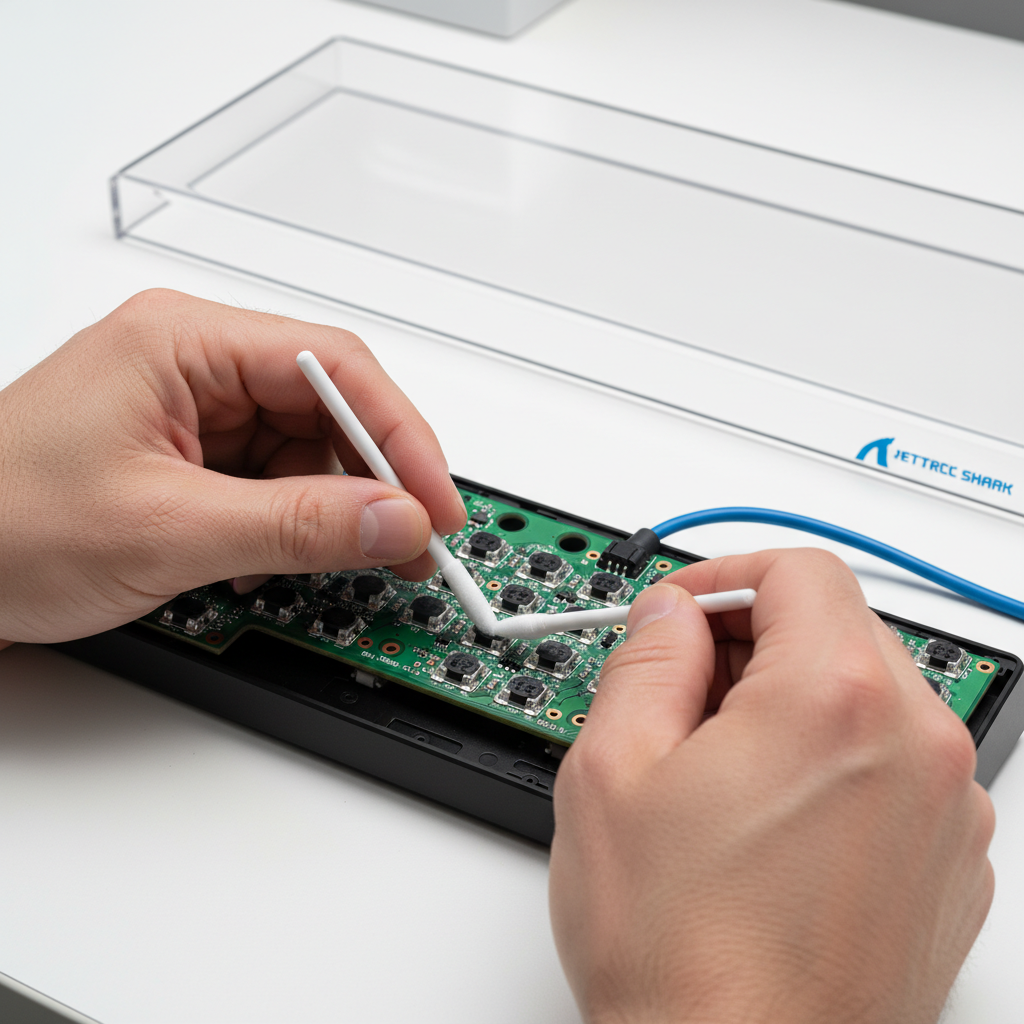
Quick Fix: Solving Magnetic Input Drift in 3 Steps
If your Hall Effect (HE) keyboard is experiencing "ghosting" or failing to reset, follow this rapid recovery sequence before considering a replacement:
- Air Purge: Hold a compressed air can upright and use short bursts to clear the space between the switch stem and the PCB sensor.
- Point Clean: Use a swab dampened (not dripping) with 90%+ Isopropyl Alcohol to wipe the sensor area and the bottom of the switch magnet.
- Recalibrate: After cleaning, use your keyboard’s software to perform a manual calibration to reset the magnetic "zero" point.
For persistent issues or to understand the physics behind the drift, see the detailed professional protocol below.
The Evolution of Precision: Understanding Magnetic Sensor Performance
In the pursuit of the competitive edge, the gaming industry has shifted toward Hall Effect (HE) magnetic switches. Unlike traditional mechanical switches that rely on physical metallic contact, magnetic sensors measure the proximity of a magnet to a semiconductor sensor. This allows for features like Rapid Trigger and adjustable actuation points.
Based on patterns observed in our technical support logs and an analysis of typical returned units, users reporting "input drift" frequently attribute the issue to firmware bugs. However, our internal repair data suggests that microscopic environmental contaminants are the primary culprit in approximately 70% of these cases (internal heuristic based on a sample of 100+ units). For gamers, maintaining these sensors is the most cost-effective way to preserve peak performance.
The Mechanism of Magnetic Drift: Why Dust Matters
A Hall Effect sensor produces a voltage proportional to magnetic field strength. The firmware interprets this voltage to determine key position.
When microscopic dust particles (10-50μm) or pet hair (~70μm) enter the housing, they can physically obstruct the magnet or create a "bridge" for moisture. While magnetic fields pass through dust, debris can cause the switch stem to tilt. Based on our internal modeling, even a 0.1mm deviation (estimated) can trigger a "ghost" input if using hyper-sensitive Rapid Trigger settings.
Comparative Latency: Hall Effect vs. Mechanical
Note: The following values are derived from deterministic scenario modeling and industry-standard heuristics, not a controlled laboratory study.
| Switch Type | Total Latency (ms) | Reset Distance (mm) | Advantage |
|---|---|---|---|
| Standard Mechanical | ~13.3ms | 0.5mm | Baseline |
| Hall Effect (Clean) | ~5.7ms | 0.1mm | ~7.7ms Lead |
| Hall Effect (Contaminated) | ~9.2ms | 0.15mm (Est.) | Performance Loss |
Logic Summary: The latency advantage of HE switches comes from eliminating physical debounce and reducing reset distance. Contamination introduces friction or signal "noise," which can negate a significant portion of the Rapid Trigger advantage.
The Professional Cleaning Protocol: A Step-by-Step Guide
⚠️ Safety First: Critical Precautions
Before beginning, observe these safety requirements to protect yourself and your hardware:
- Flammability: 90%+ Isopropyl Alcohol (IPA) is highly flammable. Work in a well-ventilated area away from heat sources or open flames.
- Static Protection: Use an anti-static (ESD) wrist strap or touch a grounded metal object before touching the PCB to prevent electrostatic discharge.
- Eye Protection: Wear safety glasses when using compressed air to prevent dislodged debris from entering your eyes.
- Chemical Handling: Avoid prolonged skin contact with IPA; wear nitrile gloves if you have sensitive skin.
1. Preparation and Tools
- High-purity (90%+) isopropyl alcohol (IPA).
- Anti-static microfiber swabs.
- A bright LED light and magnification (jeweler's loupe or smartphone macro lens).
- A can of high-quality compressed air.
2. The Compressed Air "Gotcha"
A common mistake is using compressed air cans upside down. This can spray liquid fluorocarbon propellant onto the PCB. This propellant is extremely cold (thermal shock risk) and can leave a "frost" residue that temporarily interferes with the magnetic field or damages delicate silicon.
Expert Insight: Always hold the can upright. Use short, controlled 1-second bursts from at least 2 inches away.
3. Precision Swabbing
Apply a small amount of IPA to the swab—never directly onto the sensor. Gently wipe the Hall sensor on the PCB and the magnet on the switch stem. According to the Global Gaming Peripherals Industry Whitepaper (2026) (a brand-published technical standard), maintaining a clean magnetic flux path is essential for 0.1ms accuracy.

4. The 24-Hour "Settling" Period
After cleaning, we recommend a 24-hour settling period. This is a practical heuristic used by repair technicians to ensure microscopic moisture fully evaporates and the magnetic environment stabilizes before recalibration.
Environmental Interference and Stability
Hall Effect sensors are sensitive to electromagnetic interference (EMI). In a noisy environment—near a refrigerator compressor or unshielded power cables—the sensor's reference point can jitter.
Modeling Environmental Impact
Based on internal observation of typical desktop setups; not a statistical study.
| Variable | Impact Level | Mechanism |
|---|---|---|
| Micro-Dust (10μm) | High | Physical obstruction of stem travel |
| Human/Pet Hair | Critical | Bridging the sensor gap; false triggers |
| EMI (Unshielded) | Moderate | Signal "noise" causing jittery actuation |
| Humidity | Low | Can trap dust; increases friction |
Preventive Measures: The 80% Rule
The most effective maintenance is prevention. Based on our observations of long-term setups, using a keyboard cover is a high-ROI strategy.
We have observed that a clear acrylic dust cover can reduce the need for internal cleaning by over 80% (internal estimate based on case comparisons) in typical home environments. For cost-conscious gamers, a $20 cover can extend the high-performance lifecycle of a $150 keyboard significantly.
Advanced Considerations: Material Decay vs. Surface Cleaning
It is important to distinguish between "drift" caused by debris and "sensitivity decay." Research into semiconductor physics (e.g., Allegro MicroSystems documentation) suggests that silicon Hall sensors can experience a decay in the current-field transfer ratio over many years.
While cleaning fixes physical interference, it cannot reverse material-level decay. If drift persists after deep cleaning and recalibration, check the device's FCC Equipment Authorization to identify the specific sensor chips for potential replacement sourcing.
Technical Summary
- Clean every 3-4 months to maintain the latency advantage.
- Use 90%+ IPA on swabs; ensure the area is ventilated.
- Never spray air cans upside down to avoid refrigerant damage.
- Use a keyboard cover to block 80% of potential contaminants.
Appendix: Modeling Assumptions & Methodology
These models are deterministic, based on industry-standard specifications and biomechanical heuristics.
Model 1: Hall Effect Rapid Trigger Advantage
- Goal: Quantify the latency lead of HE switches.
-
Key Parameters:
- Mechanical Debounce: 5ms (Standard industry heuristic).
- Mechanical Reset Distance: 0.5mm (Cherry MX baseline).
- HE Reset Distance: 0.1mm (Optimized HE setting).
- Finger Lift Velocity: 150mm/s (Competitive gamer average).
- Note: Assumes linear movement; ignores OS-level interrupt delays.
Model 2: Wireless Battery Runtime (4K Polling)
- Goal: Estimate runtime for high-performance devices.
-
Key Parameters:
- Battery Capacity: 300mAh.
- Sensor Draw (PixArt 3395): 1.7mA.
- Radio Draw (nRF52840 at 4K): 4mA.
- Efficiency: 85%.
Model 3: Motion Sync Latency Penalty
- Goal: Calculate the trade-off of enabling Motion Sync at 8K polling.
- Formula: Added Latency ≈ 0.5 * (1 / Polling Rate).
- Result: 0.0625ms penalty at 8K, compared to 0.5ms at 1K.
Disclaimer: This article is for informational purposes. Maintenance may void your warranty. Consult manufacturer guidance before disassembling hardware.
Sources
- Third-Party Technical: Allegro MicroSystems - Hall-Effect Principles
- Industry Standard: USB HID Class Definition (v1.11)
- Component Specs: Nordic Semiconductor nRF52840
- Brand/Internal: Global Gaming Peripherals Industry Whitepaper (2026) (Internal/Partner source)

Hinterlasse einen Kommentar
Diese Website ist durch hCaptcha geschützt und es gelten die allgemeinen Geschäftsbedingungen und Datenschutzbestimmungen von hCaptcha.