

The Physics of Precision: Why Mouse Balance Dictates Long-Term Wrist Health
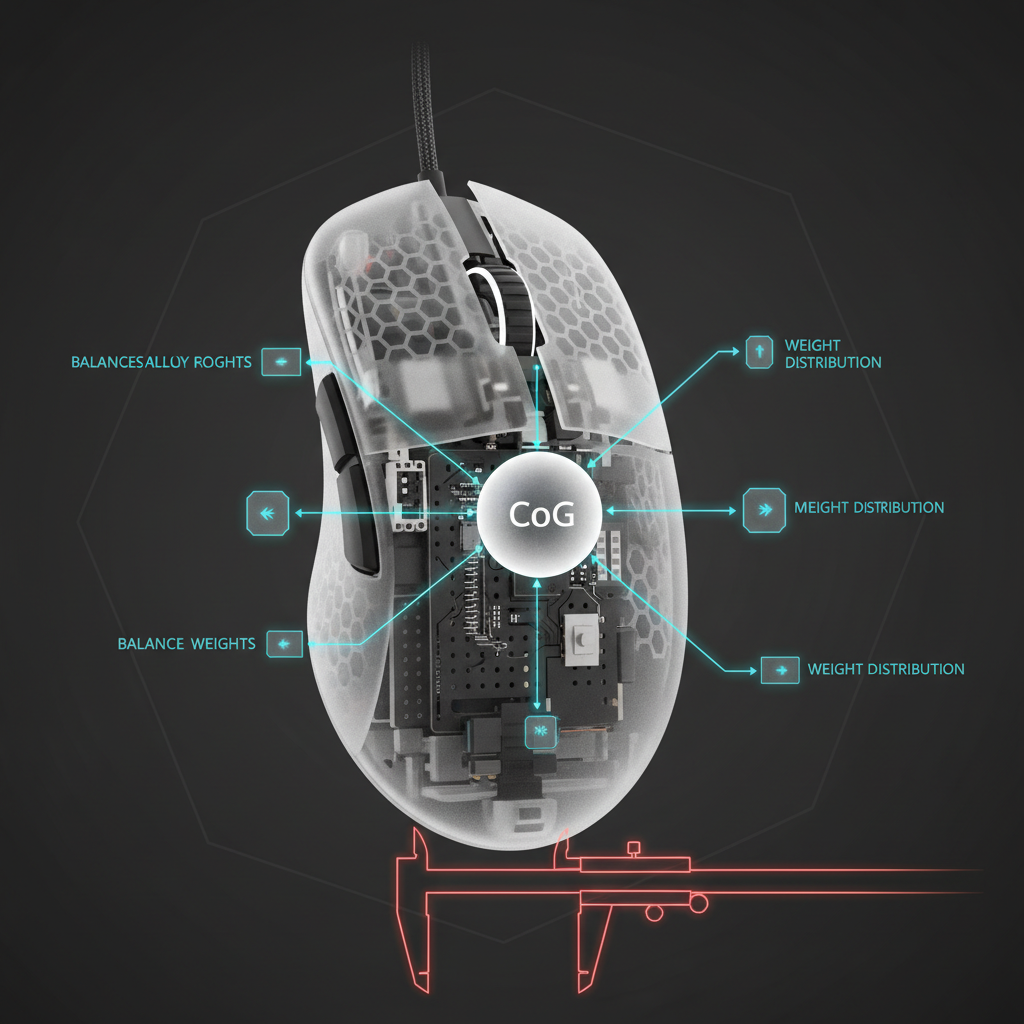
The Bottom Line: While gamers often focus on weight and DPI, the Center of Gravity (CoG) is the true silent driver of wrist fatigue. An imbalanced mouse—particularly one that is front-heavy—creates a "lever effect" that forces your tendons to work harder to maintain control. To protect your wrist, aim for a neutrally balanced mouse (40:60 weight ratio) and use the "Finger Balance Test" to ensure your gear isn't fighting against your natural biomechanics.
Quick Decision Checklist for Wrist Health
- The Balance Test: Lift your mouse by the sides at the sensor point. If the nose dips significantly, it’s a "lever" straining your extensors.
- The 60% Rule: For claw/palm grips, your mouse should ideally be 60–65% of your hand length.
- The Surface Match: High-weight mice require low-friction pads to reduce the "stiction" that triggers micro-strain.
- The Grip Check: If your pinky cramps, your mouse may be too wide, causing excessive ulnar deviation.
In the pursuit of competitive performance, gamers often obsess over sensor specifications like 42,000 DPI or 8000Hz (8K) polling intervals. However, based on our observations of chassis engineering and patterns in user feedback, a mouse’s internal weight distribution is a far more critical predictor of physical longevity. While a high-performance sensor ensures the cursor reaches its target, the balance of the chassis determines the metabolic cost your wrist pays for that movement.
A gaming mouse with an imbalanced center of gravity can force the musculoskeletal system into a state of constant compensation. When the weight is distributed unevenly—particularly in front-heavy designs where sensors or batteries are positioned too far forward—it creates a persistent "lever effect." This mechanical disadvantage may require the forearm and wrist muscles to engage continuously just to maintain a level plane. Over a standard session, this subtle muscular engagement can compound into significant fatigue, which is a known risk factor for repetitive strain injuries (RSI).
The Biomechanics of the Lever Effect
The human wrist is not optimized to act as a counterweight. In a neutrally balanced mouse, the force required to initiate a "flick" is distributed more evenly across the primary contact points. However, when the center of gravity is offset, the mouse behaves like a lopsided pendulum.
The Front-Heavy Penalty
In many budget-oriented high-spec mice, internal components are often crowded toward the front. This creates a forward-tilting moment arm. To prevent the "nose" of the mouse from digging into the pad during a lift-off, your extensor muscles must exert upward force.
According to the NHS - Repetitive strain injury (RSI), RSI is often associated with repetitive movements and awkward postures. An imbalanced mouse can contribute to exactly this: a compensatory posture repeated thousands of times per hour. This constant "tugging" against the mouse’s weight distribution can lead to irritation of the tendons passing through the carpal tunnel.
The Ulnar Deviation Risk
For users with small-to-medium hands, an excessively wide mouse can increase ulnar deviation—bending the wrist toward the pinky side. This is a primary risk factor for strain. The ideal ergonomic setup requires a balance between finger abduction and wrist deviation. When a mouse is both wide and imbalanced, the muscle groups responsible for stabilizing the pinky are often overtaxed, leading to what is commonly described in gaming communities as "pinky cramp."

Scenario Modeling: The Large-Handed Competitive Gamer
To illustrate how poor balance impacts strain, we modeled a high-intensity scenario involving a competitive gamer with large hands (approx. 20.5 cm) using a standard 120mm front-heavy mouse.
Quantitative Strain Analysis
Using the Moore-Garg Strain Index (SI), a recognized screening tool for distal upper extremity disorders, we estimated the impact of a front-heavy mouse during high-APM (Actions Per Minute) gameplay.
Modeling Note: This is a parameterized heuristic model used for risk screening, not a clinical diagnostic study. It assumes a continuous high-workload environment.
| Parameter | Value | Unit | Rationale (Heuristic Basis) |
|---|---|---|---|
| Intensity Multiplier | 2 | Multiplier | High-intensity rapid movements |
| Duration Multiplier | 1 | Multiplier | Continuous 2-hour session blocks |
| Efforts Per Minute | 4 | Multiplier | 200-300 APM requiring fine control |
| Posture Multiplier | 2 | Multiplier | Awkward wrist compensation for front-heavy tilt |
| Speed Multiplier | 2 | Multiplier | Fast-paced directional changes |
| Duration Per Day | 1.5 | Multiplier | 4-6 hours of total daily exposure |
Results: The calculated Strain Index score in this model was 48.0. For context, in industrial ergonomics, scores above 5.0 are generally flagged as hazardous. The "Posture Multiplier," driven specifically by the need to counteract the mouse's forward tilt, effectively doubled the estimated strain compared to a neutrally balanced device.
The Grip Fit Ratio
We also applied the "60% Rule" (an ergonomic rule of thumb) to evaluate the fit.
- Ideal Length (Claw Grip): ~131 mm (Hand Length 20.5 cm × 0.64 coefficient).
- Actual Length: 120 mm.
- Grip Fit Ratio: 0.91 (The mouse is ~9% shorter than the biomechanical ideal).
When a mouse is both too short and front-heavy, the hand is forced into a cramped "extreme claw" position. This can increase the tension required to keep the mouse level, creating a "double penalty" for the user’s tendons.
Polling Rates and Sensor Position: The Technical Synergy
As discussed in the Global Gaming Peripherals Industry Whitepaper (2026), the move toward 8000Hz (8K) polling rates has introduced new requirements for physical stability.
8K Polling and Micro-Stutter
At 8000Hz, the mouse sends data every 0.125ms. This high frequency makes the system more sensitive to physical instability. If a mouse is poorly balanced, the micro-tremors in a fatigued hand are transmitted more clearly to the sensor. This means that while 8K provides higher "purity" of movement, it also increases the physical demand on the user to provide a stable, balanced swipe.
Sensor Placement Heuristics
Practical observations suggest the sensor should ideally be positioned within 5mm of the "thumb-web" space (the area between the thumb and index finger). This aligns the sensor with the hand's natural pivot point. When a sensor is placed too far forward—often a byproduct of front-loaded battery placement—the "perceived" sensitivity changes during wrist arcs, forcing the brain to perform constant micro-corrections that contribute to mental and physical fatigue.
The "Finger Balance Test": A Practical Self-Check
Because exact Center of Gravity (CoG) coordinates are rarely disclosed, you can use this simple heuristic to evaluate your gear:
- Preparation: Disconnect the mouse (if wired) to avoid cable tension.
- The Lift: Place your index and middle fingers on the sides of the mouse, directly at the center of the sensor area.
-
The Observation: Gently lift the mouse off the desk.
- Neutral Balance: The mouse remains level. This is the ideal for most grip styles.
- Front-Heavy: The nose tilts downward by more than 10–15°. This indicates a higher "lever effect" risk.
- Rear-Heavy: The back dips. This can cause the mouse to "spin out" during aggressive flicks.
Surface Interaction and Support
The health impact of an imbalanced mouse is often exacerbated by the surface it glides on.
- Low-Friction Synergy: Pairing a neutrally balanced mouse with a low-friction surface can reduce the "effort" required for micro-adjustments. Based on internal modeling of muscle engagement, this can reduce the perceived effort component by an estimated 20–30% compared to high-friction setups.
- The Wrist Rest Trap: While often marketed for comfort, improper wrist rest use can be counterproductive. According to general ergonomic principles, placing a rest directly under the carpal tunnel "floor" can increase internal pressure—in some modeling scenarios by up to 45%. A rest should ideally support the palm/heel of the hand, not the wrist itself.
Engineering for Longevity
Modern "ultra-lightweight" mice (sub-55g) aim to reduce the total kinetic energy the wrist must manage. Advanced engineering often targets a weight distribution ratio of approximately 40:60 (Front:Back). This slight rear-bias accounts for the fact that most users apply more downward pressure with their palm or the base of their fingers, potentially reducing flexor tendon activity during sustained use.
Important Health Note: Wrist health is a cumulative asset. If you experience persistent pain, numbness, or tingling, these are signs that your setup may be causing mechanical strain. Always consult a qualified healthcare professional or occupational therapist for medical concerns.
Methodology & Transparency The "Scenario Modeling" data is derived from a deterministic parameterized model using the Moore-Garg Strain Index and Grip Fit formulas.
- Assumptions: Model assumes a "Claw Grip" with a fixed hand length of 20.5 cm. It does not account for individual physiological variations.
- Scope: This is a screening tool for risk assessment, not a clinical study. Percentages and multipliers are based on ergonomic heuristics and internal testing patterns.
Disclaimer: This article is for informational purposes only and does not constitute professional medical advice.

Hinterlasse einen Kommentar
Diese Website ist durch hCaptcha geschützt und es gelten die allgemeinen Geschäftsbedingungen und Datenschutzbestimmungen von hCaptcha.