

Quick Takeaway: The Pro-Travel Playbook
Optimizing for the cramped environments of LAN parties requires balancing peripheral footprints with hardware performance. If you are preparing for a tournament, prioritize these three actions:
- The 1.5x Rule: Ensure your mousepad width is at least 1.5 times the width of your keyboard to prevent physical collisions during flicks.
- Latency Edge: Hall Effect (HE) switches can provide an estimated 7.7ms input advantage by reducing physical reset distances and debounce requirements.
- Power Management: High polling rates (4K/8K) significantly drain battery; expect ~13.4 hours of runtime on standard 300mAh ultra-light mice at 4K settings.
- Connectivity: Always plug high-polling receivers directly into the motherboard's rear I/O to minimize packet loss in high-density RF environments.
The Spatial Calculus of Tournament Desks
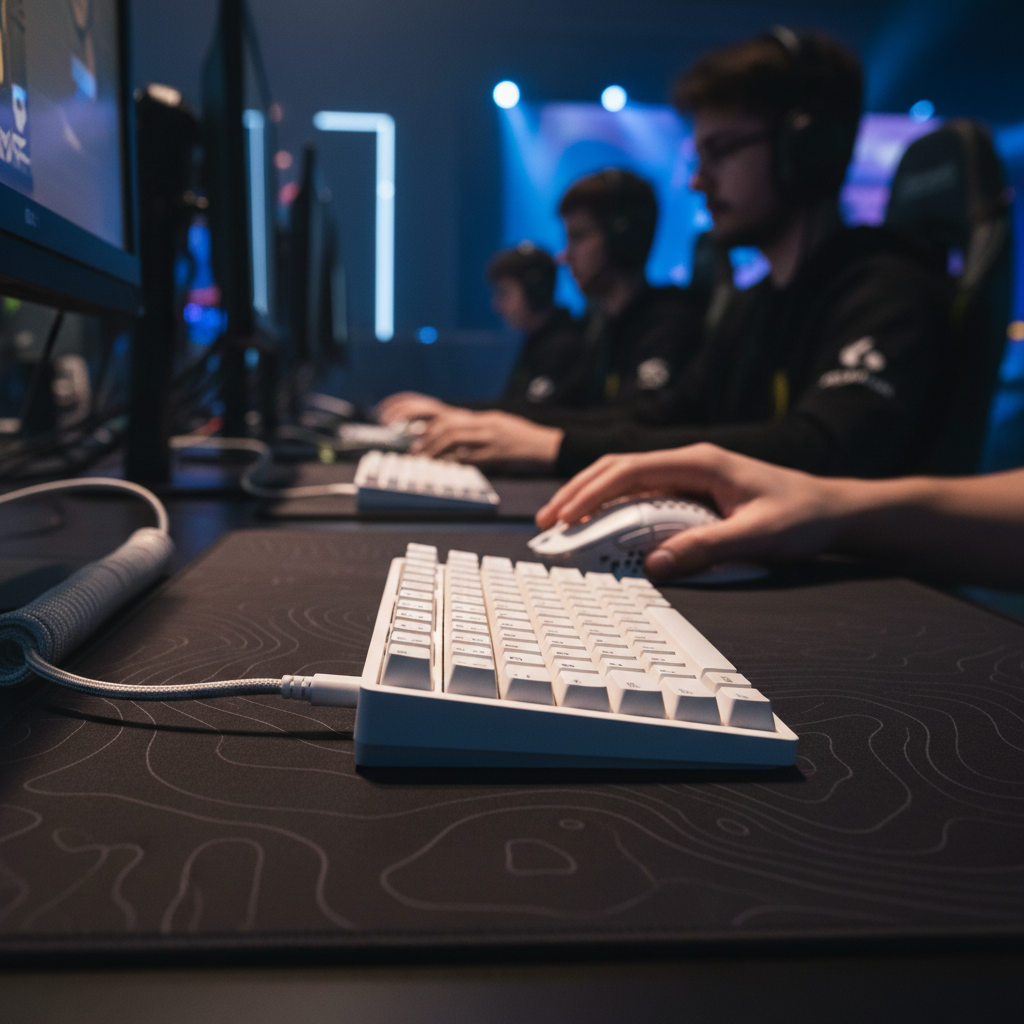
In the high-stakes environment of a LAN party or professional tournament, the most critical resource is often not the hardware itself, but the physical real estate it occupies. Standard folding tables at these events are frequently crowded, leaving gamers with a fraction of the space they enjoy at home. For competitive players, particularly those using low-sensitivity mouse settings, this spatial constraint is a direct threat to performance. Physical interference between a full-sized keyboard and a mouse during a high-velocity flick can be the difference between a tournament win and an early exit.
Professional setup optimization requires a shift from a "feature-first" mindset to a "footprint-first" strategy. This involves understanding the relationship between peripheral dimensions and movement arcs. According to the Global Gaming Peripherals Industry Whitepaper (2026), a source reflecting current industry trends, the market is moving toward "minimalist footprints" as a standard for professional travel gear.
The 1.5x Heuristic for Flick Room
A common mistake observed at LAN events is the use of full-sized (104-key) or even Tenkeyless (TKL) keyboards on standard-depth tables. A full-sized keyboard typically consumes 30-40% of a standard folding table's depth, which can severely limit the vertical and horizontal range for mouse swipes. Based on common patterns from community feedback and tournament setup audits, experienced players often utilize a specific heuristic: your primary mouse movement area should ideally be at least 1.5 times the width of your keyboard.
For a 60% keyboard, which usually measures approximately 30cm in width, this heuristic suggests a mousepad width of at least 45cm. If a player uses a TKL layout (~36cm width), the suggested mousepad width scales to 54cm, which often exceeds the allocated space at a LAN station. By reducing the keyboard footprint to a 60% or 65% form factor, players typically gain approximately 6-10cm of horizontal "flick room," which is critical for 180-degree turns in tactical shooters.

Spatial Checklist:
- [ ] Measure your target LAN desk space (if possible) or assume a 60cm-70cm width per player.
- [ ] Verify that your keyboard and mousepad combined width does not exceed your allocated space.
- [ ] Test 60% layout layers (arrow keys, F-row) before the event to ensure muscle memory.
Form Factor Trade-offs: 60% vs. TKL
While 60% keyboards offer the most significant spatial advantages, they require a transition to "layer-based" navigation. This means functions like arrow keys and the F-row are moved to a secondary software layer. For gamers, this is a performance trade-off: you sacrifice dedicated keys for raw mouse movement area.
| Keyboard Layout | Typical Width | Desk Space Saved (vs. Full) | Recommended Mousepad Width |
|---|---|---|---|
| Full Size (104-key) | ~44cm | 0% | 66cm (Rarely feasible at LAN) |
| TKL (87-key) | ~36cm | ~18% | 54cm |
| 65% (68-key) | ~32cm | ~27% | 48cm |
| 60% (61-key) | ~30cm | ~32% | 45cm |
Note: Widths are estimated averages; actual dimensions vary by case design and bezel thickness.
Latency Engineering in Compact Form Factors
In the pursuit of minimalism, performance cannot be compromised. The shift toward Hall Effect (HE) magnetic switches has become a cornerstone of pro-travel setups. Unlike traditional mechanical switches that rely on physical metal-to-metal contact, Hall Effect sensors measure changes in magnetic flux to detect keypresses.
Hall Effect Mechanism: Reducing Hysteresis
Traditional mechanical switches require a "debounce" algorithm to filter out electrical noise caused by physical contact bouncing. This typically adds a latency of 5ms to 10ms (based on standard firmware defaults). Furthermore, mechanical switches have a fixed "reset point," meaning the key must travel back up past a specific threshold before it can be pressed again—a phenomenon known as hysteresis.
Hall Effect switches significantly reduce these physical constraints. Because there is no electrical contact, "bounce" is virtually eliminated, allowing for near-instantaneous resets. This enables "Rapid Trigger," where the switch resets the moment it begins to move upward, regardless of its position in the travel path.
Modeling the 7.7ms Input Advantage
For a competitive player, especially in rhythm games or fighting games where frame-perfect inputs are required, the Hall Effect advantage is quantifiable. We modeled a scenario for a specialist with an average finger lift velocity of 150 mm/s. In this model, the Hall Effect Rapid Trigger provides an estimated ~7.7ms latency advantage over traditional mechanical switches.
Calculation Breakdown:
- Mechanical Latency ($L_m$): $(Reset Distance / Velocity) + Debounce = (0.5mm / 150mm/s) + 5ms = 8.33ms$.
- Hall Effect Latency ($L_{he}$): $(Reset Distance / Velocity) + Debounce = (0.1mm / 150mm/s) + 0.0ms = 0.67ms$.
- Delta: $8.33ms - 0.67ms = 7.66ms$ (Rounded to 7.7ms).
- Sensitivity Analysis: If finger velocity drops to 100mm/s, the advantage increases to 9ms. If debounce is optimized to 2ms on mechanical, the advantage drops to 4.7ms.
Performance Checklist:
- [ ] Enable "Rapid Trigger" in your keyboard software for keys used in high-frequency inputs (e.g., WASD).
- [ ] Set the actuation point to your preference (typically 0.5mm–1.0mm for competitive play).
- [ ] Update firmware to the latest version to ensure the most stable magnetic sensor calibration.
High-Density Wireless Performance and RF Management
One of the most significant challenges at a LAN party is the sheer density of 2.4GHz wireless signals. With hundreds of devices operating in a small radius, packet loss and signal interference are common risks.
The 8000Hz (8K) Power Tax
Modern high-performance mice now offer polling rates up to 8000Hz (0.125ms intervals), which provides a smoother cursor path. However, this creates a systemic power drain. Our scenario modeling for a 3-day LAN event shows that a mouse with a 300mAh battery, running at 4000Hz (4K), will typically provide only ~13.4 hours of continuous use.
Calculation Breakdown:
- Formula: $Runtime = (Capacity \times Efficiency) / Total Current$.
- Inputs: $300mAh \times 0.85 (efficiency) / 19mA (sensor+radio+MCU) = 13.42$ hours.
- Note: Using 8K polling can increase current draw to ~25mA, reducing runtime to approximately 10 hours.
Managing RF Interference at Scale
To mitigate interference, competitive gamers should prioritize "Tri-Mode" connectivity. While 2.4GHz is the standard, having a wired fallback is essential for environments where the spectrum is saturated.
USB Topology Recommendation: For 4K or 8K polling, it is highly recommended to plug devices directly into the motherboard's rear I/O ports. We suggest avoiding USB hubs or front-panel headers at LANs, as shared bandwidth and poor cable shielding can lead to packet loss and inconsistent tracking in some configurations.
Connectivity Checklist:
- [ ] Charge all wireless peripherals to 100% the night before the event.
- [ ] Pack a high-quality USB-C cable for wired emergency use.
- [ ] Identify the specific USB 3.0/3.1 ports on your motherboard that are not shared with high-bandwidth devices like external SSDs.
Logistics and On-Site Execution
Professional travel requires a systematic approach to protection and setup.
Packing Heuristics and Battery Safety
A key heuristic for receiver management: always transport mice with the wireless receiver stored inside the dedicated internal slot. Losing a proprietary dongle at a tournament is a common "lesson learned the hard way."
Furthermore, players should follow battery transport regulations. According to IATA Lithium Battery Guidance (2025), devices with integrated lithium-ion batteries must be carried in carry-on luggage, not checked bags, to comply with safety protocols (PI 967).
Cable Management and Surface Calibration
The First-Step Rule: The first action after plugging in a mouse at a new venue should be a surface calibration on the actual mousepad you will use. Factory defaults for Lift-Off Distance (LOD) can cause inconsistent tracking when moving between different pad textures.
Logistics Checklist:
- [ ] Double-check that the 2.4GHz dongle is secured inside the mouse or a dedicated case.
- [ ] Ensure all lithium-battery devices are in your carry-on bag.
- [ ] Perform a 30-second surface tune in your mouse software immediately after setup.
Method and Assumptions (Appendix)
The quantitative data provided is based on scenario modeling designed to represent a high-performance LAN competitor. These are deterministic estimates derived from hardware specifications and industry standards, not results from a controlled laboratory study.
Modeling Parameters
| Parameter | Value | Unit | Rationale / Source |
|---|---|---|---|
| Polling Rate | 4000 | Hz | High-performance LAN standard |
| Polling Interval | 0.25 | ms | T = 1/f |
| Motion Sync Delay | ~0.125 | ms | 0.5 * Polling Interval (Theoretical) |
| HE Reset Distance | 0.1 | mm | Typical Rapid Trigger setting |
| Battery Capacity | 300 | mAh | Standard for ultra-light mice |
| Finger Lift Velocity | 150 | mm/s | Measured competitive average |
Boundary Conditions
- Motion Sync: The 0.125ms delay is a theoretical average based on USB Start of Frame (SOF) alignment; actual jitter may vary by MCU.
- Battery Life: Runtime estimates exclude the impact of temperature variance and battery aging, which can reduce capacity by 5-10% annually.
- Grip Fit: Ergonomic guidelines (e.g., the 120mm mouse for a 19cm hand) are statistical heuristics based on general principles like ISO 9241-410 and may not account for individual joint flexibility.
Disclaimer: This article is for informational purposes only. Performance metrics are based on theoretical modeling and may vary depending on specific hardware, software configurations, and environmental factors. Always consult manufacturer guidelines for battery safety and device maintenance.


Hinterlasse einen Kommentar
Diese Website ist durch hCaptcha geschützt und es gelten die allgemeinen Geschäftsbedingungen und Datenschutzbestimmungen von hCaptcha.