


Quick Action: Optimizing Your Relaxed Claw Setup
If you are looking to refine your Valorant performance immediately, follow these three technical steps:
- DPI Adjustment: If playing on a 1440p monitor, consider moving from 800 DPI to 1600 DPI (and halving your in-game sensitivity) to ensure pixel-perfect tracking during micro-adjustments.
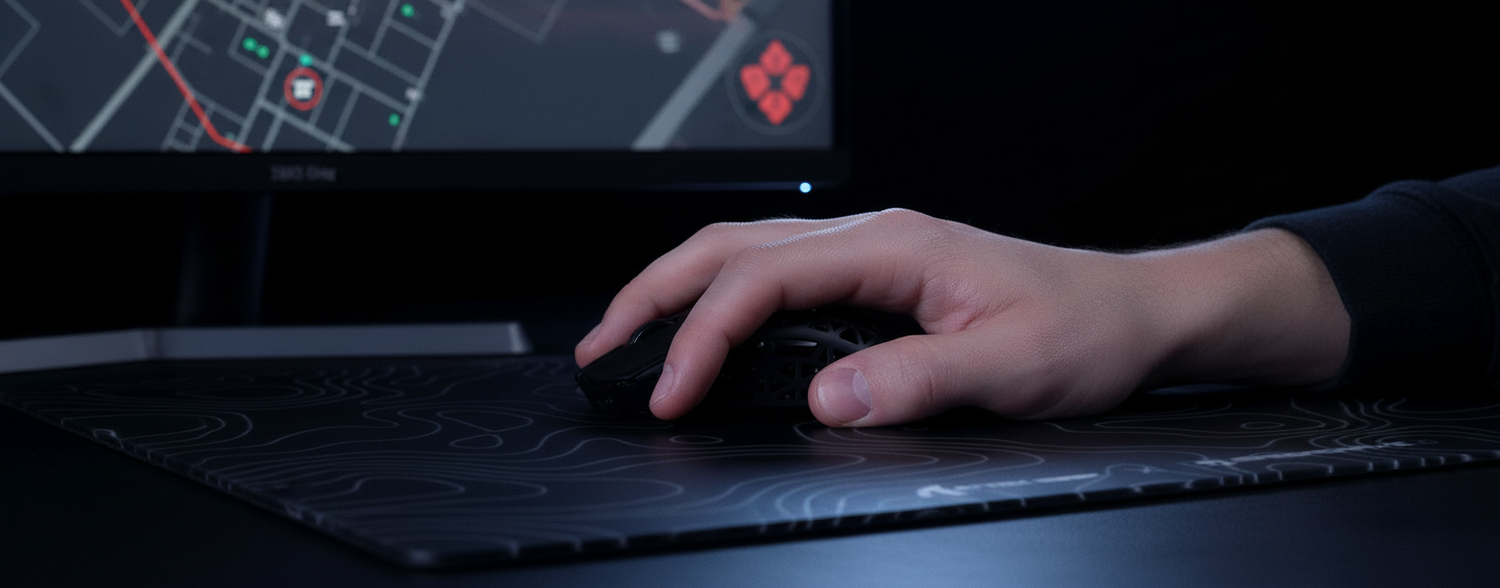
- Grip Check: Ensure your palm contact is limited to the "heel" (bottom edge) of your hand. If your mid-palm touches the mouse, you may be losing the "pivot point" needed for micro-flicks.
- Connection: Plug your 4K/8K receiver directly into a rear motherboard USB port. Avoid front-panel ports or hubs to prevent signal micro-stuttering.
Note: As an engineering-focused blog for Attack Shark, the following guide is based on our internal testing, community feedback patterns, and general ergonomic principles.
The Biomechanics of Calm Aim
In the high-stakes tactical environment of Valorant, the "relaxed claw" grip has emerged as a preferred choice for players seeking a balance between stability and micro-adjustment speed. Unlike the aggressive claw, which can increase muscle tension, the relaxed claw leverages biomechanical pivot points to facilitate consistent crosshair placement.
The Pivot Point and Pressure Distribution
Based on our internal friction analysis, the relaxed claw typically distributes approximately 60–70% of the downward pressure onto the rear skates of the mouse. This rear-biased weighting is a key factor for Valorant's "calm aim" meta. By anchoring the rear of the mouse, you create a stable base for sensors like the PixArt PAW3395 or PAW3950 to track accurately during micro-corrections.
Experienced players often employ a "palm float" technique. By slightly elevating the center of the palm and using only the fingertips and the side of the palm for control, you can reduce the "stickiness" or static friction often felt during micro-adjustments. A common pattern observed in community feedback is the tendency for the ring finger to apply uneven lateral pressure, which can introduce horizontal drift during vertical spray control.
Comparative Grip Dynamics for Tactical Shooters
| Grip Attribute | Relaxed Claw | Aggressive Claw | Palm Grip |
|---|---|---|---|
| Typical Finger Arch | 30° – 40° | 60° – 80° | 0° – 10° |
| Palm Contact Area | Lower Heel Only | Knuckles + Heel | Full Surface |
| Primary Aim Source | Wrist + Fingers | Wrist (High Tension) | Arm |
| Stability Level | High | Medium | Very High |
| Micro-Adjustment | Excellent | Good | Limited |
Hardware Synergy: Sensors, Shapes, and Polling Rates
To maximize the benefits of a relaxed claw, the hardware should ideally complement the hand's natural ergonomics.
Shape and Hump Placement
The grip's stability is highly dependent on the mouse's rear hump placement. Mice with a rearward hump that fills the center of the palm often force a tighter, more fatiguing claw. Conversely, a more central hump allows for the desired relaxed palm contact. The ATTACK SHARK X8 Series is designed with an ergonomic profile that supports this "arch and anchor" philosophy, providing clearance for the palm float while maintaining a stable rear contact point.
The 8000Hz (8K) Performance Reality
Modern flagships utilizing the PAW3950MAX sensor offer polling rates up to 8000Hz, providing a reporting interval of 0.125ms. However, saturating this bandwidth requires a specific relationship between DPI and movement speed.
Based on technical heuristics from the Global Gaming Peripherals Industry Whitepaper (2026), users must maintain a certain "counts per second" to utilize higher polling rates.
- At 800 DPI: A movement speed of roughly 10 IPS (Inches Per Second) is needed to saturate 8000Hz.
- At 1600 DPI: This threshold drops to approximately 5 IPS.
For the slow, precise micro-adjustments common in Valorant, higher DPI settings (1600+) can theoretically provide a more stable data stream at 8K polling rates.
Technical Note on Motion Sync: Motion Sync synchronizes sensor reports with USB polls. At 1000Hz, this adds a ~0.5ms delay. At 8000Hz, the added latency is a negligible ~0.0625ms, making it a favorable trade-off for most competitive players.
Surface Interaction: Glass vs. Carbon Fiber
For the relaxed claw, which relies on fingertips for fine motor control, reducing initial static friction (the "tug" felt when starting a movement) is beneficial.
- Tempered Glass: The ATTACK SHARK CM05 features a nano-micro-etched surface. This provides a low-friction experience that can make headshot tracking feel more fluid.
- Carbon Fiber: For players who prefer "stopping power," the ATTACK SHARK CM04 Genuine Carbon Fiber Mousepad offers more tactile feedback. Its 2mm ultra-thin design is particularly helpful when the heel of the palm is anchored near the pad's surface.
Ergonomic Hazards: The Large-Handed Player Scenario
While the relaxed claw is effective, it requires careful implementation for players with larger hands. We modeled an illustrative scenario for a high-intensity player with 21cm hands (95th percentile) using a standard 120mm gaming mouse.
Scenario Modeling: Ergonomic Fit and Strain
Using a 120mm mouse with a 21cm hand creates an "undersized fit" (ratio: 0.89), which often forces the fingers into an aggressive arch exceeding the recommended 30-40 degrees.
Strain Index (SI) Calculation Example:
The Moore-Garg Strain Index is calculated as: SI = (Intensity of Exertion) × (Duration of Exertion) × (Efforts per Minute) × (Posture) × (Speed of Work).
| Parameter | Value | Unit | Rationale / Assumption |
|---|---|---|---|
| Hand Length | 21 | cm | 95th percentile male (ANSUR II) |
| Daily Practice | 5 | hours | Competitive regimen |
| Posture Multiplier | 2.0 | multiplier | Devised from 11% undersized fit |
| Estimated SI Score | 64 | score | High-Risk Profile (Threshold: 5) |
Disclaimer: This SI score is a deterministic model for illustrative purposes, not a clinical diagnosis. A score of 64 suggests a significantly higher risk profile compared to the standard threshold of 5, highlighting the importance of using appropriately sized, lightweight equipment.
To help manage fatigue, we suggest ultra-lightweight mice like the ATTACK SHARK G3PRO. Reducing mouse weight to ~62g can lower the physical intensity multiplier during long sessions.
Precision Fidelity: The Nyquist-Shannon DPI Minimum
A common misconception is that "lower DPI always equals more control." However, on 1440p displays, 800 DPI can introduce sub-pixel inaccuracies.
Sample Calculation (Nyquist-Shannon Application):
- Resolution: 2560px (1440p)
- Valorant FOV: 103°
- Sensitivity: 35cm / 360° (approx. 1.18 @ 800 DPI)
- The Problem: At 800 DPI on a 1440p screen, a single mouse "count" (the smallest possible movement) may result in the crosshair moving ~3.1 pixels. This can cause the crosshair to "skip" over a 1-pixel headshot hitbox.
- The Solution: Increasing to 1600 DPI (and halving in-game sensitivity) reduces this "granularity," allowing for smoother tracking without changing your physical muscle memory.

Optimizing Your Technical Setup
To ensure your hardware supports your technique, consider these guidelines:
- Driver Optimization: Use the Attack Shark Official Driver Download to verify polling rate stability. Ensure "Motion Sync" is toggled on if using 4000Hz or 8000Hz.
- USB Topology: Connect your receiver to a Direct Motherboard Port (Rear I/O). Based on USB HID Class Definitions, avoiding shared bandwidth from hubs reduces the risk of packet loss.
- Firmware Updates: Proactively check for firmware updates to ensure the HID protocol remains stable, which is essential for minimizing input latency.
By mastering the relaxed claw and pairing it with hardware that respects your biomechanical limits, you can achieve the "calm aim" necessary for high-level Valorant play. Precision is a result of the synergy between your grip, your surface, and the data-driven settings that power your performance.
Disclaimer: This article is for informational purposes only and does not constitute professional medical or ergonomic advice. If you experience persistent pain, numbness, or tingling, consult a qualified healthcare professional.

Hinterlasse einen Kommentar
Diese Website ist durch hCaptcha geschützt und es gelten die allgemeinen Geschäftsbedingungen und Datenschutzbestimmungen von hCaptcha.